• This email address is being protected from spambots. You need JavaScript enabled to view it.

×

Notice

The forum is in read only mode.

Welcome, Guest
Username: Password: Remember me
31 Aug 2022
Our new version 11.0.11.0 is now available.
Read More...
  • Page:
  • 1

TOPIC:

Re: New Floor Template 22 Jan 2013 08:58 #546

  • admin
  • admin's Avatar
In the Projects tab, select ensure the floor that you want to copy is your current selected floor, by selecting it (it turns red when selected).

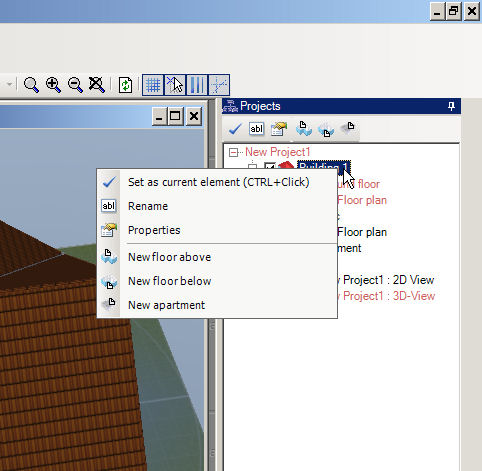
In the Projects tab, right click on the Building layer and select New Floor Above from the context menu.

In the activated dialog, select As new top floor

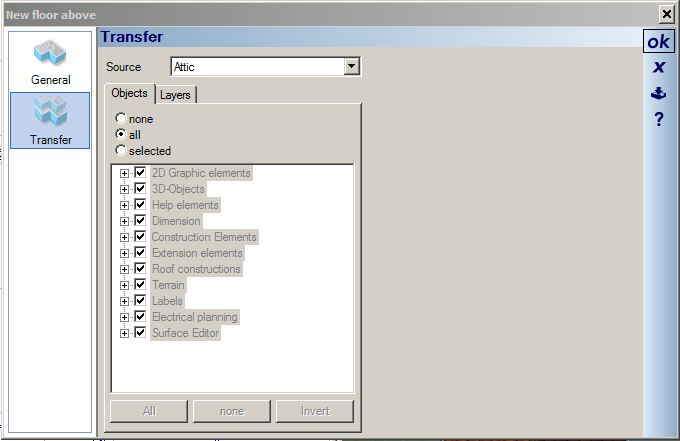
This activates:

Select the transfer tab, and then select the features that you want to copy to your new floor, and the select OK.

The new floor will then be created.

This is also demonstrated in the following video, fast forward to 4:35.

New Floor Template 22 Jan 2013 08:56 #545

How can I copy an existing floor to another floor, ie use an existing floor as a template to a new floor.

TM [via email]
  • Page:
  • 1
Time to create page: 0.080 seconds