• This email address is being protected from spambots. You need JavaScript enabled to view it.

×

Notice

The forum is in read only mode.

Welcome, Guest
Username: Password: Remember me
31 Aug 2022
Our new version 11.0.11.0 is now available.
Read More...
  • Page:
  • 1

TOPIC:

Re: Missing roof functions 07 Apr 2013 13:13 #696

  • admin
  • admin's Avatar
Roof on floor:

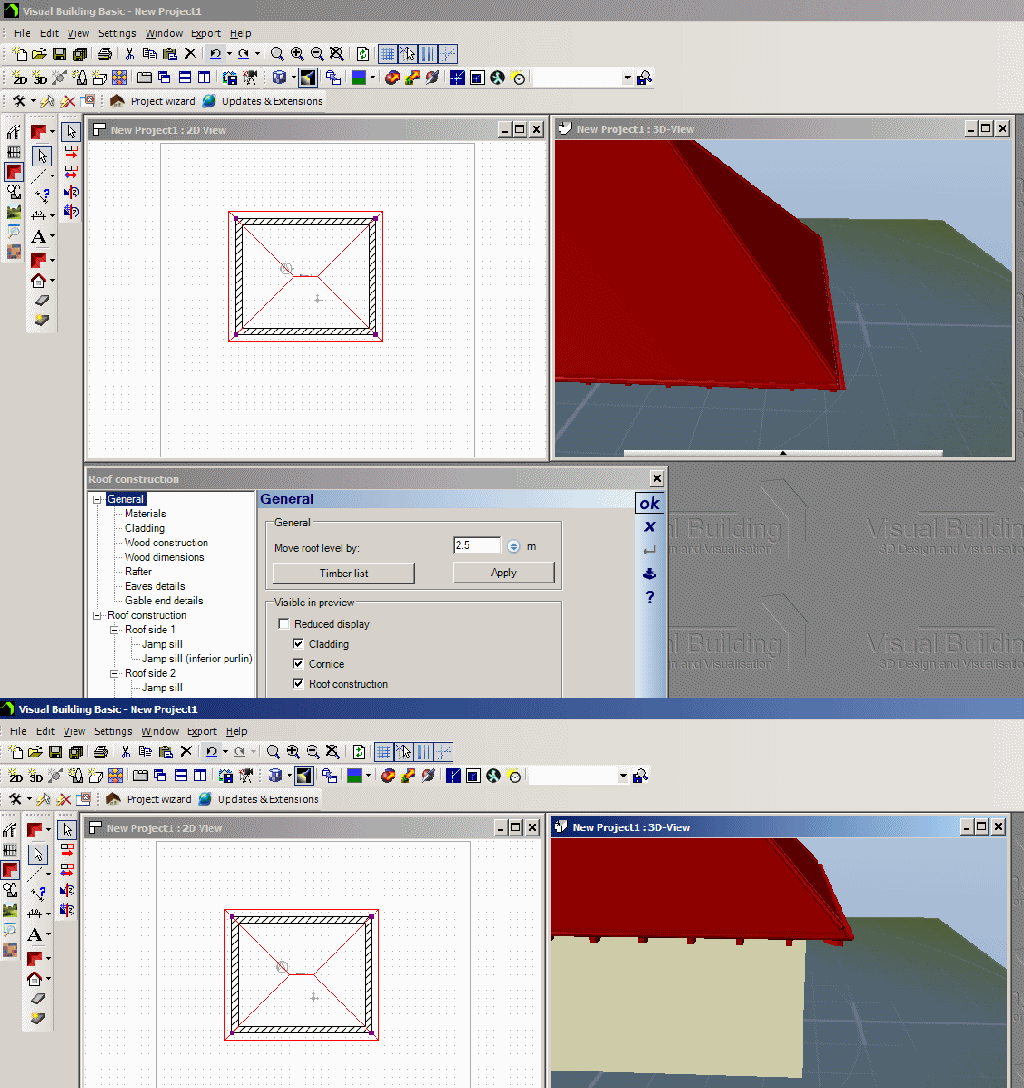
Alternatively to creating a new floor you can also just raise the height of the roof:


1. In the 3D view right click on the roof and select Properties

2. In the activated Rof dialog General section enter the value by which you want to raise the roof, click on Apply, then OK.

Your roof will be set to the new height

Re: Missing roof functions 07 Apr 2013 12:56 #695

  • admin
  • admin's Avatar
You need to create a new attic floor to place your roof, or raise your roof height. Please see here for an explanation

Re: Missing roof functions 07 Apr 2013 12:47 #694

  • C Marshall
  • C Marshall's Avatar Topic Author
  • Offline
  • Posts: 6
OK - thanks. It seems to have been a toolbar issue as you suspected.

Now though my automatically generated roof on my 1 story building has automatically been placed at ground level even though the walls of my building are 2.4m high. So I can't understand why the automatic roof insertion has not put the roof actually on top of my bulding as per the training video and I can't see how to get the roof on the building as opposed to on the ground. Any ideas please?

Re: Missing roof functions 07 Apr 2013 12:19 #693

  • admin
  • admin's Avatar
All features are enabled in the trial version, so the cause will be due to some other reason.

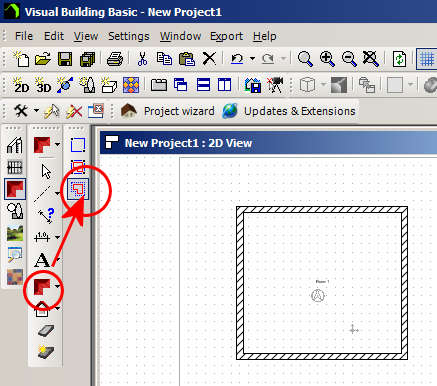
When you click on the Roof icon in the Roof icon the the What toolbar the sub tool bar should appear in the How toolbar, as in the following image:
.

It is possible to hide or reposition these toolbars and in order to reset your toolbar positions please see the following:

See: Reset your tool bars

See: Lock your tool bars

Missing roof functions 07 Apr 2013 11:22 #692

  • C Marshall
  • C Marshall's Avatar Topic Author
  • Offline
  • Posts: 6
I've just downloaded the free trial for Visual Building Basic and I am trying to add a roof to my simple floor plan. However placing my mouse cursor over the simple polygon does not select it, as per the training videos and help index, and the [Insert Roof] icon in the "what" toolbar does not provide the sub-options to insert roof on selected contour or insert roof with Polygon that are mentioned in the training videos and the help.

Is my software defective, is automatic roof insertion disabled in the trial version, am I missing something or does this roof functionality just not work.

It's one of the first things I have tried to do and after a couple of hours I am no where so not finding my trial very satisfying so far.

Any light anyone can shed most appreciated.
  • Page:
  • 1
Time to create page: 0.090 seconds